


FTP
(CuteFTP) Tutorial

CuteFTP Overview
CuteFTP
allows you to easily transfer your web page files from your computer
to your web space on our servers.
Contents:
How
to set up CuteFTP
Short explanation of the folders for your account
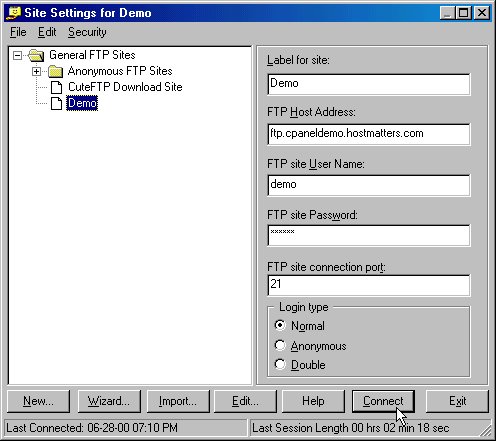
Create a connection entry for your site with the information you received in your welcome letter. If you no longer have the welcome letter, the required information for your account (except your password) can be viewed on your control panel in the upper left. You can create the entry using the IP address for your site, or by using ftp.yourdomain.com, as shown below, if your domain name is active on our system. Type in the appropriate username and password for your account. Note that your password is automatically stored for you - remember to change your password here if you change your password via your control panel!
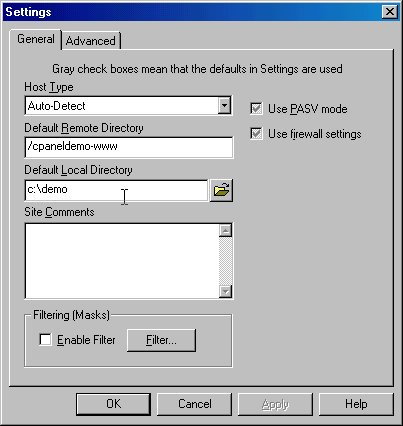
Once you've entered that information, click the Edit button. You can set the directory where the program will start by default by entering that path in the "Default Remote Directory". Generally, you will want to set this to the main folder for your site, which is /yourdomainname-www, as shown below. You can also set the directory where your files are located on your pc by specifying that directory in the "Default Local Directory" field, again, as shown below. Please note that the slash direction is important when entering these paths. Click OK to save these settings.
A short explanation of the folders for your account:
When you FTP to your account, or when you view a list of files and folders from the File Manager on the control panel, you will see certain system-created folders for your use. These folders should not be deleted when maintaining your account: domainname-www, www, domainname-logs, domainname-secure, domainname-mail, and cgi-bin. In addition, if you install FrontPage extensions on your account, the _vti* folders should be added to the list. Deleting these folders could leave your site inaccessible until support can restore them or recreate them.